Introduction
Facebook bundle gives you most Popular Facebook features in one module. Available options: Facebook Commnets, Facebook Chat, Facebook Login, WhatsApp Chat
Installation
- Navigate to Modules section in your BO.
- Click "Upload a Module" button at the top right corner.
- Now you will see the upload form, please select pkfacebook-v.1.x.zip from your disk.
- Confirm your choice, upload module. You will see confirmation message.
- Find "Facebook Bundle" in your modules list, and install it
General
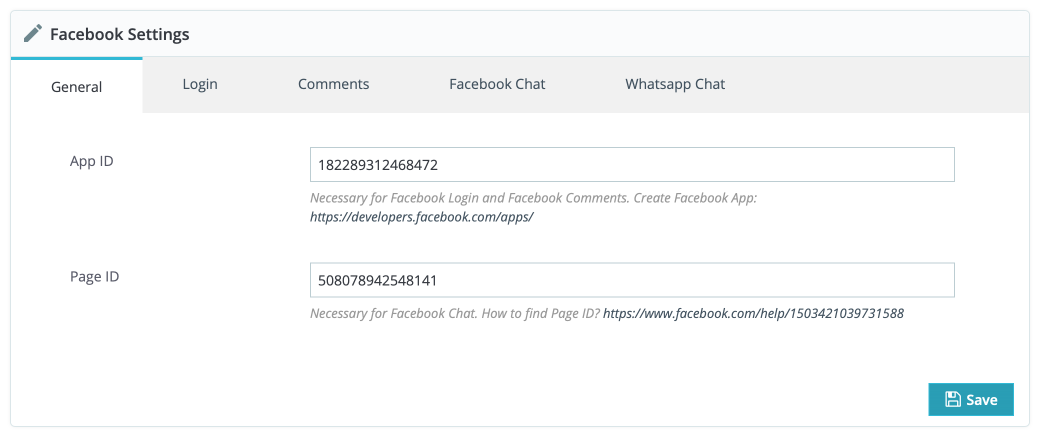
In the "General" tab you have to add two keys which are necessarry to make the module work.
App ID — is an ID of your Facebook Application. Used by Facebook Login and Facebook Comments. You have to register your Application first. Go to https://developers.facebook.com. Registration creates an App ID.
Page ID — is ID of your Facebook Page and used by Facebook Chat. If you don't have a page yet, please create one https://www.facebook.com/help/104002523024878?helpref=about_content. Then use following service to get your Page ID https://findmyfbid.com.
Login

Most important option here is a Login Button Parent Element. You have to find a class or ID in the source code of your website of the element where you want to display Login Button to. Than add that class/ID to the field.
Comments

Comments Location — Product Comments can be displayed in two different places at Product Page. You can choose between Product Tabs or just in the very bottom of the page "Product Footer". Used hooks by this option are: displayFooterProduct, displayProductExtraContent
Admins — Grant moderation privileges for selected facebook accounts. Separate all admin IDs by commas IDs of Facebook private profiles
Facebook Chat

Here you can manage Facebook Chat. Useful option here to not irritate your customers is a Delay before the Chat will be displayed. Set the number of seconds of delay before the greeting dialog is shown after the plugin is loaded.
WhatsApp Chat
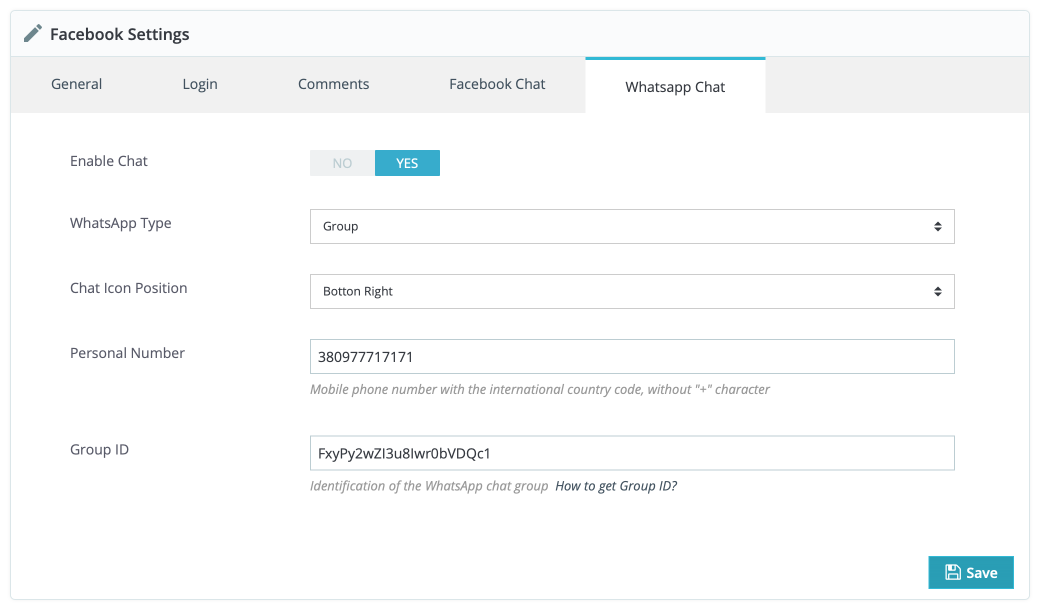
Necessary hook for WhatsApp Chat is: displayBeforeBodyClosingTag
WhatsApp Type — choose between Group and Personal whatsapp.
Personal Number — In case you choosed "Personal" WhatsApp type, add your personal phone number.
Group ID — In case you choosed "Group" WhatsApp type, add your Group ID. How to find an ID?
Used Hooks
displayHeaderdisplayFooterProductdisplayProductExtraContentdisplayBeforeBodyClosingTag
Troubleshooting
Sometimes user getting an error with Facebook customer chat plugin on the website – "Refused to display in a frame because an ancestor violates the following Content Security Policy directive:". This error visible in the browser's consle. What to do in case of this problem?
Whitelisted Domains
Whitelisted the domain name at Facebook page settings (please check again, If you give access, remove access to third-party tools, they may clear the whitelisted domain names list)
Facebook page is Publicly Visible
Make sure that the Facebook page is publicly visible and not resisted by age, country and make sure other users can send a message. If age, the country restriction is added to the Facebook page, the messenger may visible only to the users who logged in to Facebook in that browser.
HTTPS
Make sure the Website is Served over HTTPS. It may work even if the website is not loading from https, but at whitelisted domains, section adds a website with HTTP also.
Cache
Sometimes cache plugins installed on the website may not update according to the settings. Clear the cache created by cache plugins and native Prestashop cache as well. It also might be browser cache, clear the cache from the browser, and test.
Page ID
Please make sure Page ID in Module Settings is correct